Keyboard Control
NimOS offers several keyboard controls. To activate the keyboard control, left-click on any of the channels.
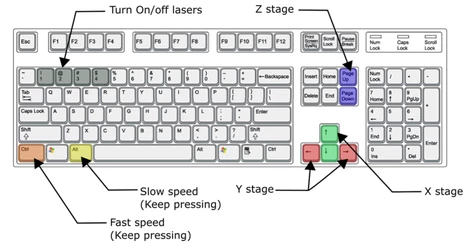
- Arrows: controls X/Y translation.
- PgUp/PgDn: controls Z translation.
- Ctrl: activate coarse translation (faster speed). The speed can be defined in Settings > User Settings per user.
- Alt: activate fine translation (slower speed). The speed can also be defined in Settings > User Settings per user:
- Gamepad control (e.g. an Xbox controller) is also supported.